Overview
Over the past few years, inexpensive Android-powered streaming boxes—frequently powered by AllWinner (e.g., H616, H313) or Rockchip (e.g., RK3328) System-on-Chips (SoCs)—have proliferated across international e-commerce platforms. Marketed as low-cost media centers capable of 4K streaming, many of these devices lack Google Play Protect certification and ship with customized Android Open Source Project (AOSP) firmware builds.
As part of a broader research initiative, we investigated budget IoT streaming hardware for security vulnerabilities and factory-installed malware. A primary focal point was residential proxy networks, which recent industry reports have repeatedly identified embedded within inexpensive Android TV appliances.
In this case study, we document the physical teardown, hardware-level firmware extraction, and subsequent static analysis of two off-the-shelf Android TV set-top boxes using FirmwareDroid (FMD).
Supply Chain & Threat Model
Off-brand Android TV devices operate within an opaque global supply chain where hardware manufacturers, turnkey board-solution providers, and secondary firmware resellers operate independently.
1
2
3
4
5
6
7
8
9
10
11
[OEM / Chipset Vendor]
        │  Reference BSP & Kernel
        ▼
[White-Label Solution Provider]
        │  Adds launcher & system apps (Malware injection point A)
        ▼
[Device Reseller / Brand Wholesaler]
        │  Customizes ROM with ad syndicates (Malware injection point B)
        ▼
[End Consumer]
        Receives pre-compromised hardware out of the box
Because these devices are not subject to Google’s Compatibility Test Suite (CTS) or Google Mobile Services (GMS) licensing agreements, they undergo zero mandatory pre-market vetting. Threat actors exploit this lack of oversight to embed monetization malware, click-fraud frameworks, or residential proxy nodes directly into the read-only /system partition prior to commercial packaging and distribution.
Background & Motivation
Our initial methodology attempted to dynamically monitor and analyze network traffic emitted by the set-top boxes, looking for anomalous request-response flows indicative of proxy or botnet activity. However, this approach presented two fundamental limitations:
- Encrypted Payloads without TLS Interception: Without breaking TLS connections, network analysis was strictly confined to transport metadata, connection targets, and DNS queries. While metadata provides useful heuristics, inspecting the exact operations and payloads of suspicious daemons requires deeper payload visibility.
- Non-Deterministic and Delayed Activation: Residential proxy clients and click-fraud malware rarely trigger immediately upon first boot. Payloads routinely implement sleep timers, require external Command-and-Control (C2) activation signals, or wait for specific user interactions before launching background threads.
To circumvent these limitations, we pivoted to hardware-based firmware extraction followed by comprehensive static analysis using FirmwareDroid.
Hardware Inspection & Opening the Devices
For this study, we purchased two popular budget set-top boxes from Temu:
- Wudung Android Mini TV Box
- XC99 Max Android TV Box
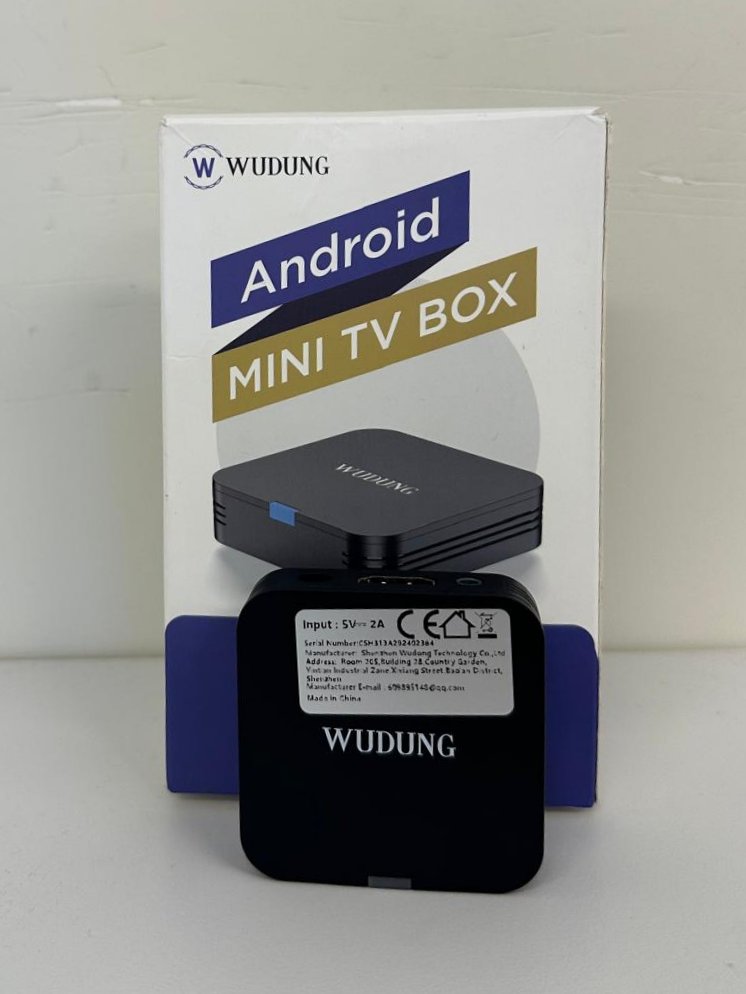
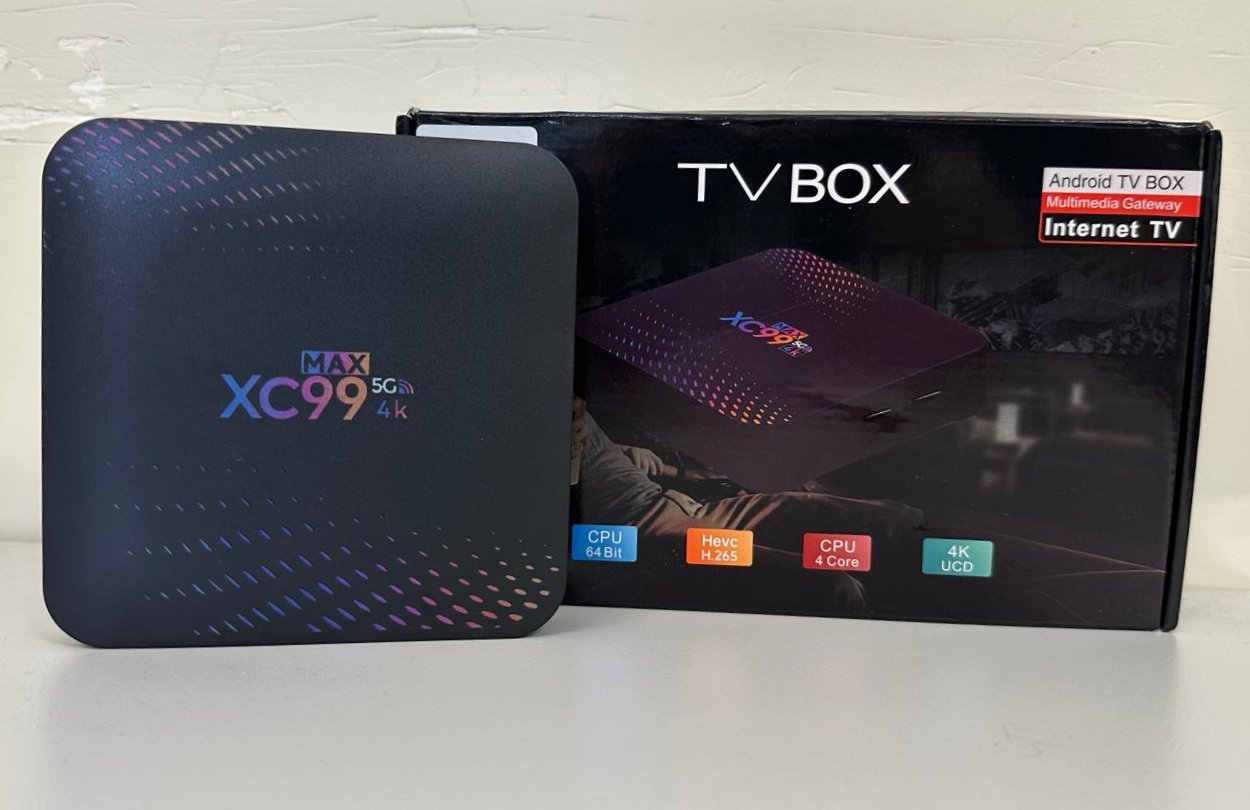
Opening both enclosures revealed accessible UART (Universal Asynchronous Receiver-Transmitter) interfaces. While common on development and reference boards, production consumer hardware frequently has UART test pads removed, unpopulated, or disabled at the silicon level.
Fortunately, both boards exposed unpopulated pin headers with active serial logging enabled by default, granting direct access to the device bootloaders.
Firmware Extraction
1. XC99 Max Android TV Box: TFTP over Ethernet
Connecting to the UART interface of the XC99 Max allowed us to interrupt the boot sequence and enter the U-Boot bootloader environment. As is characteristic of white-label embedded hardware, the vendor relied on an unmaintained U-Boot fork dating back to 2014.
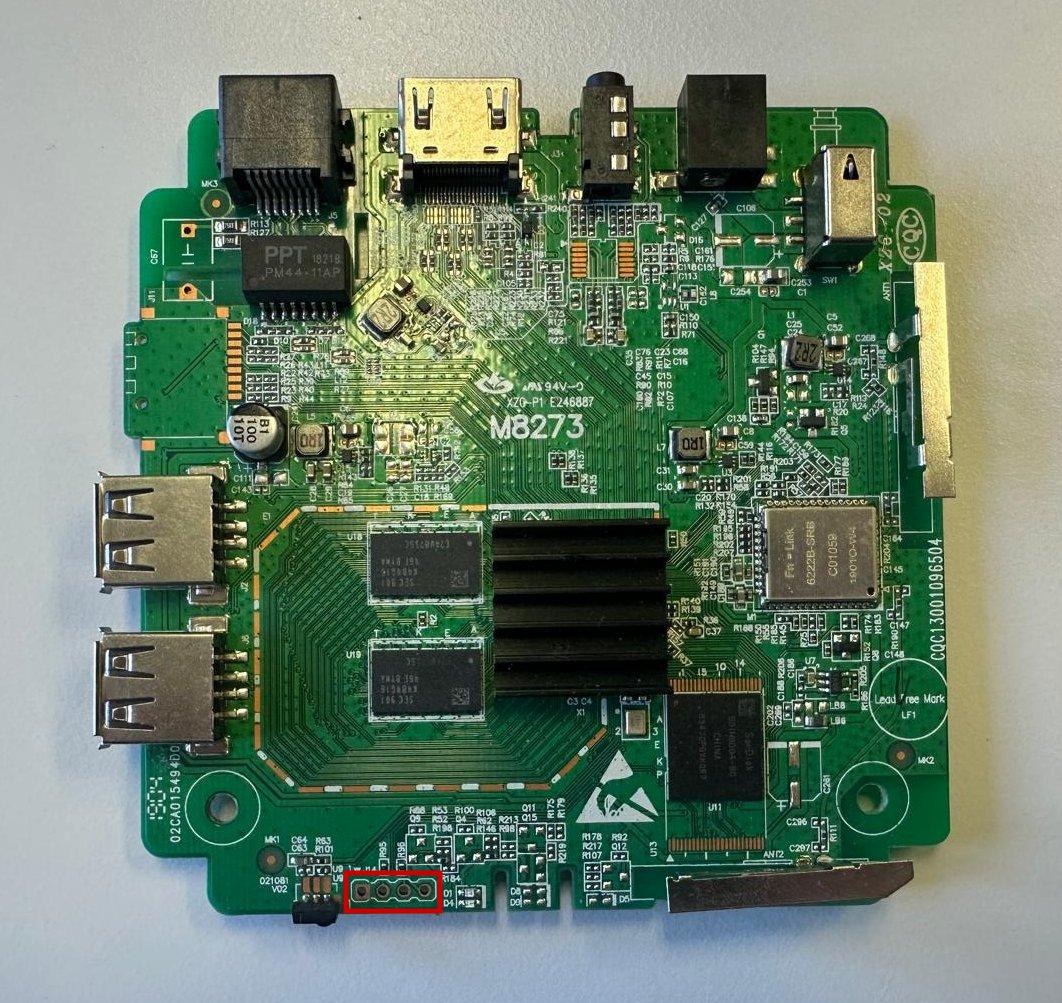
The XC99 Max board offered several potential extraction avenues. We selected the onboard Ethernet interface, leveraging U-Boot’s built-in TFTP client:
- Chunk Size Constraints: While standard TFTP can support transfers up to 32 MB per session, the outdated bootloader implementation consistently crashed when handling transfers larger than 16 MB.
- RAM Allocation: We identified a contiguous, unallocated 256 MB segment in device RAM to stage data copied from flash memory before transmitting it to our TFTP host.
- Transfer Strategy: For an approximately 8 GB total flash image, the firmware had to be dumped in 512 discrete 16 MB chunks across multiple iterations.
The transfer sequence proceeded as follows:
- Copy 256 MB from eMMC flash memory to RAM using the U-Boot
mmc readcommand. - Push the data to the host workstation in sixteen consecutive 16 MB TFTP packets (
tftpput). - Repeat across subsequent eMMC block offsets until the entire storage space was dumped.
- Concatenate and verify the chunks on the host machine.
Because manual orchestration would have taken hours, we automated the interaction using a Minicom expect script:
1
2
3
4
5
6
7
8
9
10
11
12
13
14
15
16
print "Synchronizing with U-Boot..."
send ""
expect "fastboot#"

print "Loading MMC chunk 1/32 into RAM..."
send "mmc read 0 0x10000000 0x0 0x080000"
expect "fastboot#"

print "Uploading sub-chunk 1 via TFTP..."
send "tftpput 0x10000000 0x1000000 /tftpboot/mmc_001.bin"
expect "fastboot#"

print "Uploading sub-chunk 2 via TFTP..."
send "tftpput 0x11000000 0x1000000 /tftpboot/mmc_002.bin"
expect "fastboot#"
# ... sequence continues through mmc_512.bin ...
Due to memory leak bugs in the 2014 U-Boot codebase, the bootloader occasionally crashed every 20–30 chunks, requiring a power cycle and script resumption at the last committed offset. Within approximately two hours, all 512 raw chunks were retrieved and reassembled into a valid 8 GB raw disk image.
2. Wudung Android Mini TV Box: Root Shell & USB Dump
The Wudung Mini TV Box presented a substantially smaller form factor with fewer physical interfaces. Crucially, it lacked an RJ-45 Ethernet port.
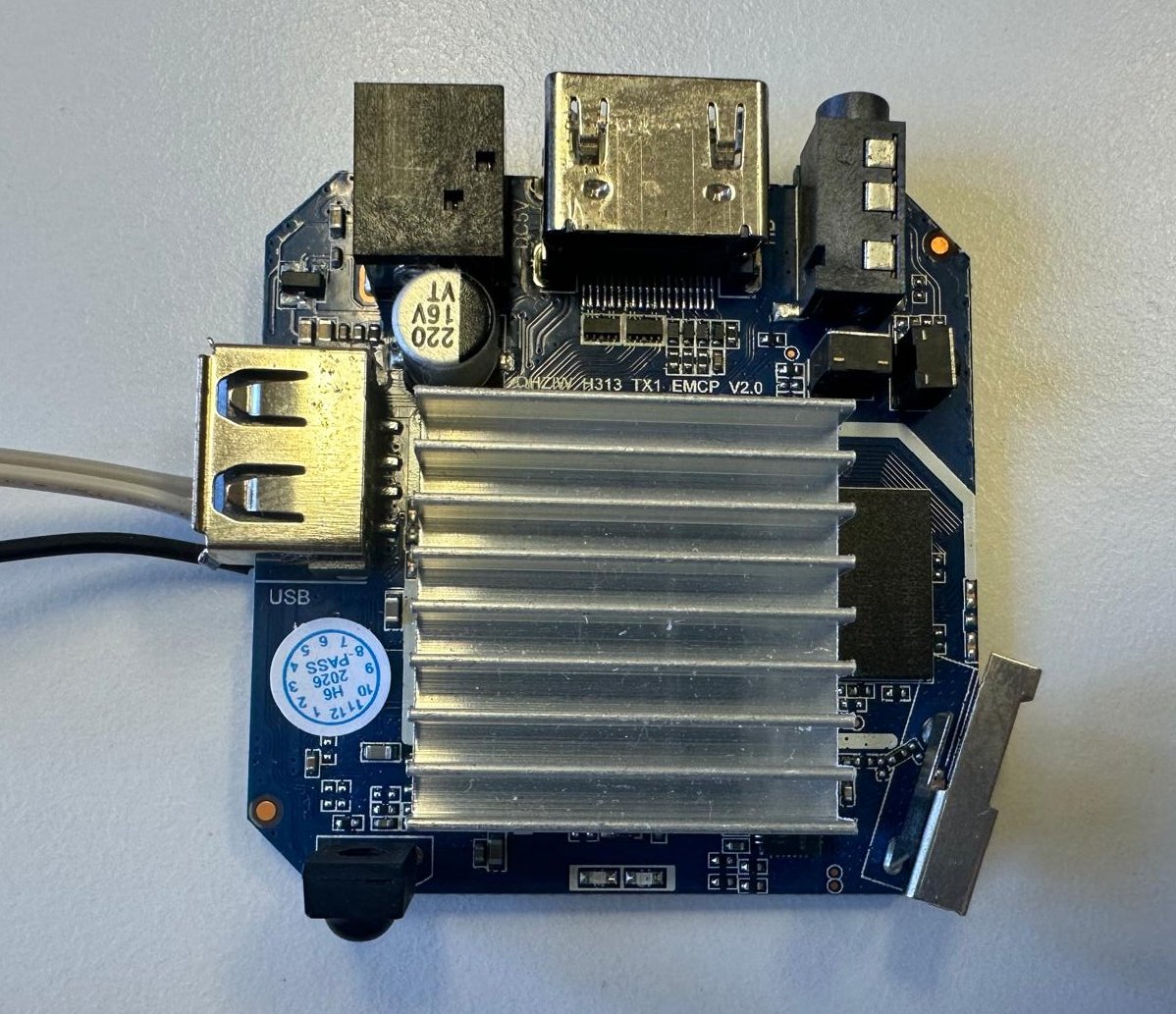
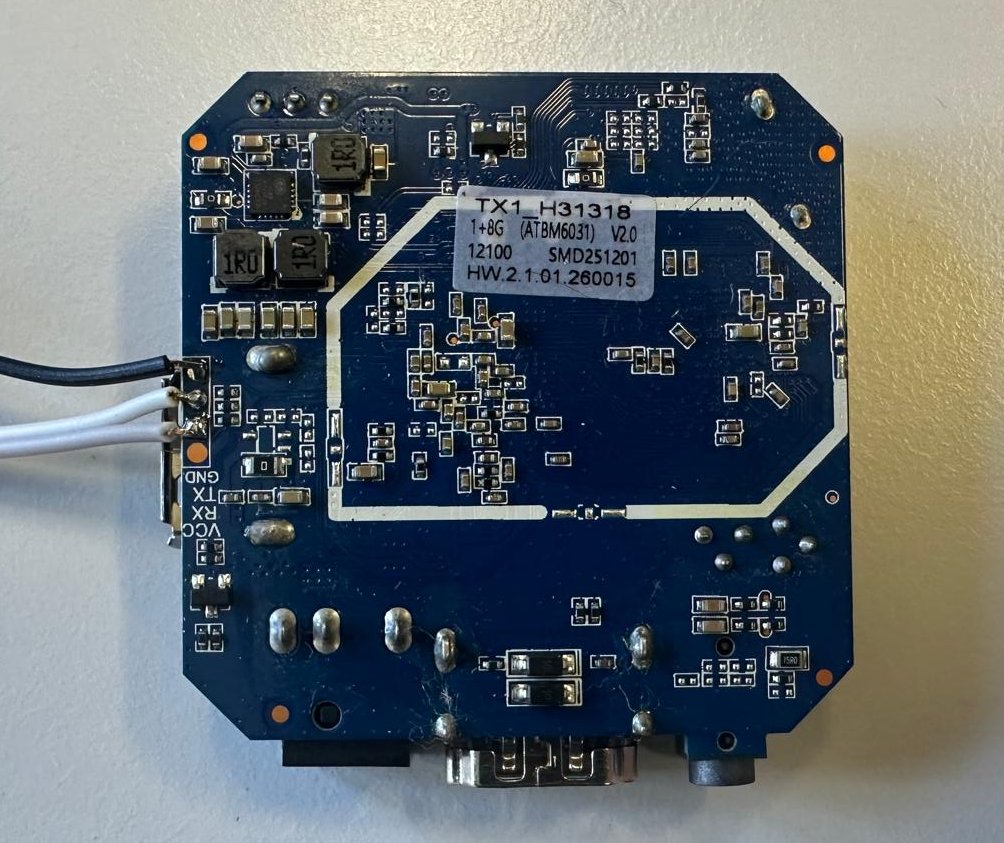
While we could access U-Boot over UART, initializing the onboard Wi-Fi chip without proprietary firmware blobs in the pre-boot environment proved impractical.
Instead, we leveraged the bootloader to alter the kernel boot arguments, appending init=/bin/sh to drop directly into an unauthenticated root shell upon kernel initialization. Once inside the embedded Linux environment:
- We inserted an external USB drive into the box’s single USB 2.0 port.
- Mounted the external filesystem under
/mnt/usb. - Executed a direct raw copy of the internal storage block device using
dd:
1
dd if=/dev/block/mmcblk0 of=/mnt/usb/wudung_firmware_raw.img bs=4M status=progress
This extraction completed in under 10 minutes—proving substantially faster, simpler, and more reliable than TFTP over Ethernet.
Wudong: Static Analysis with FMD
Once the raw flash images were reconstructed, we ingested both images into FMD using its automated pipeline:
flowchart LR
    A[("Raw Flash Image")]
    B["FMD WebUI"]
    C["Partition Unpacking"]
    D["File Inventory"]
    E["Static Analysis Triage<br/>(MobSF · APKiD · AndroGuard)"]
    F(["Manual Review & Reversing"])

    A --> B --> C --> D --> E --> F

    style A fill:#eff6ff,stroke:#3b82f6,stroke-width:2px,color:#1e3a8a
    style B fill:#f8fafc,stroke:#94a3b8,stroke-width:1.5px,color:#1e293b
    style C fill:#f8fafc,stroke:#94a3b8,stroke-width:1.5px,color:#1e293b
    style D fill:#f8fafc,stroke:#94a3b8,stroke-width:1.5px,color:#1e293b
    style E fill:#fffbeb,stroke:#f59e0b,stroke-width:1.5px,color:#92400e
    style F fill:#f0fdf4,stroke:#10b981,stroke-width:2px,color:#064e3b
1. Partition Disassembly and Inventory
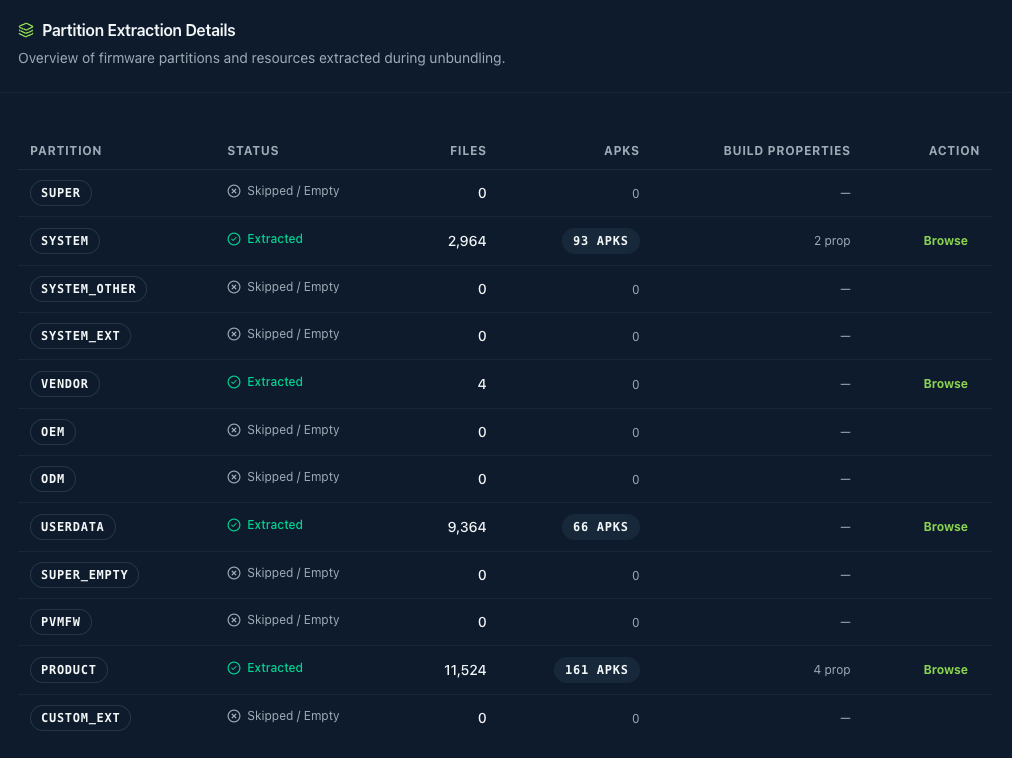
FMD unpacked the partition table, locating four partitions, which is typical for Android.

We found 320 apk files on the device pre-installed in the /system/app, /system/priv-app, etc. directories.
2. Findings
Overview of the findings from the Wudong Android Mini TV Box:
- Debuggable Build & Test Keys: The device ships with a userdebug build with unauthenticated ADB, and its firmware and system apps are signed with the public AOSP test keys. Anyone can therefore sign apps that run with system privileges on the device.
- Unlockable Bootloader: The device supports OEM unlocking, allowing for the installation of custom ROMs.
- Debug/Repackaged APKs: The pre-installed
org.xbmc.kodiapp was repackaged, made debuggable and re-signed with the AOSP test key, raising concerns about potential malicious modifications.
Debuggable Build & Test Keys
One of the first things we noticed was that the TV box uses an Android userdebug build. Userdebug builds enable many debugging features, such as ro.debuggable=1 and a su binary for root access over ADB. On top of that, the vendor disabled ADB authentication (ro.adb.secure=0) and enabled ADB by default (persist.sys.usb.config=mtp,adb). As a result, anyone can run ADB commands on the box without the usual RSA confirmation prompt.
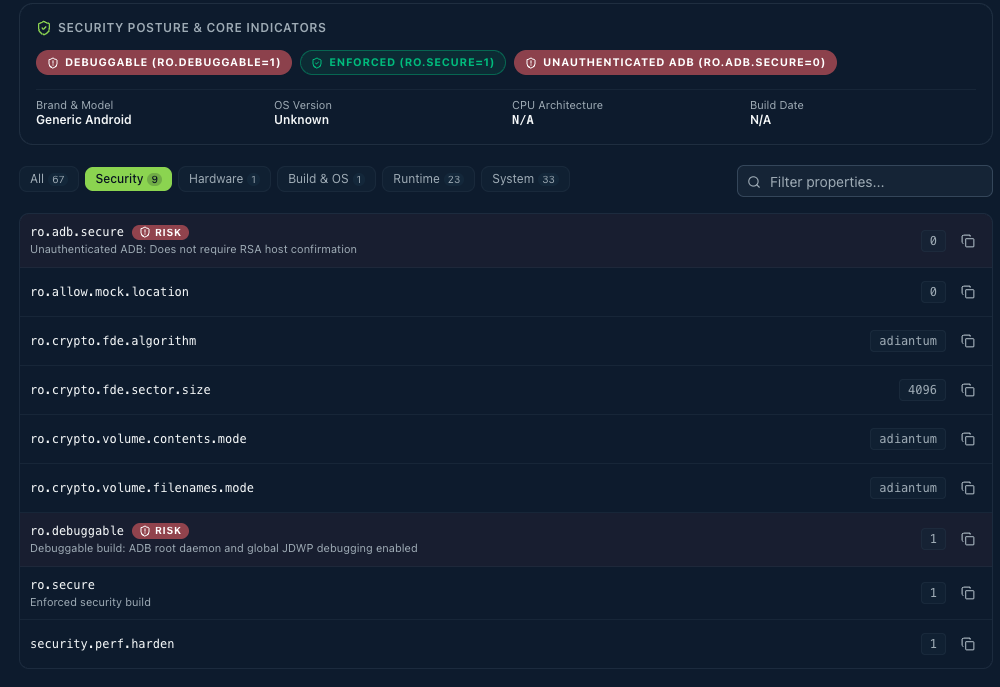
For a production device, this is a serious security issue. An attacker with physical access, or network access if ADB over TCP is enabled, can connect to the device and, via the su binary, gain full root control of the system.
What made this even worse is the fact that the firmware was signed with the public AOSP test keys instead of the vendor’s own release keys. These keys are part of the AOSP source tree (build/make/target/product/security/), so their private keys are available to anyone. Android grants system privileges (android:sharedUserId="android.uid.system") and signature-level permissions only to apps signed with the same key as the platform. Because that key is public, an attacker can sign their own app with it and have it run with system privileges on the device. The same applies to updates of the vendor’s pre-installed system apps, which can be replaced by modified versions. Even full system updates are affected, since the recovery trusts the public AOSP OTA test key.
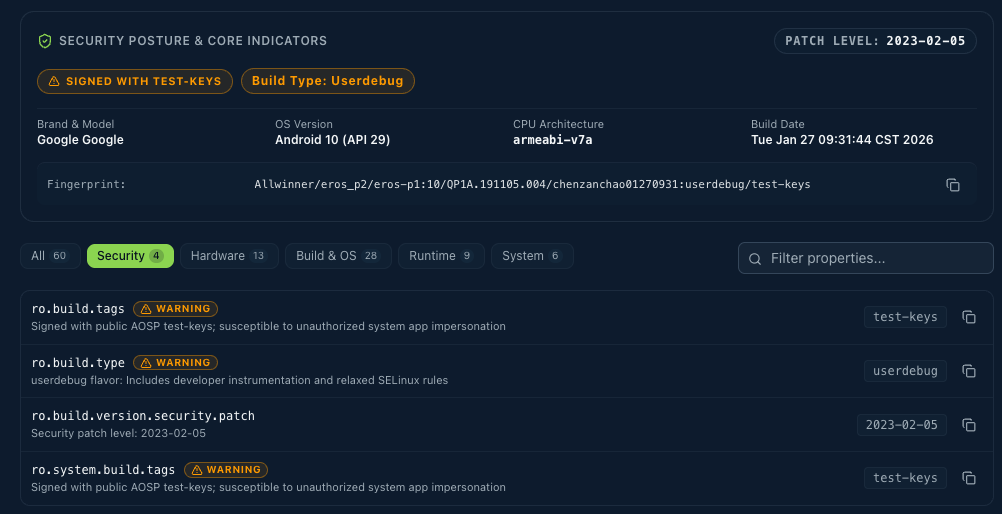
On a side note, the build properties of the device revealed that the property ro.oem_unlock_supported is set to 1. This means OEM unlocking can be enabled in the developer options, allowing us to unlock the bootloader and install a custom ROM.
In case you are wondering whether an anti-virus application would have detected this, the answer is: maybe, if you are lucky. For instance, we can take some of the pre-installed apps and scan them with VirusTotal (see images below). The results are mixed: some of the scanners detect the usage of default signing keys, while most do not.
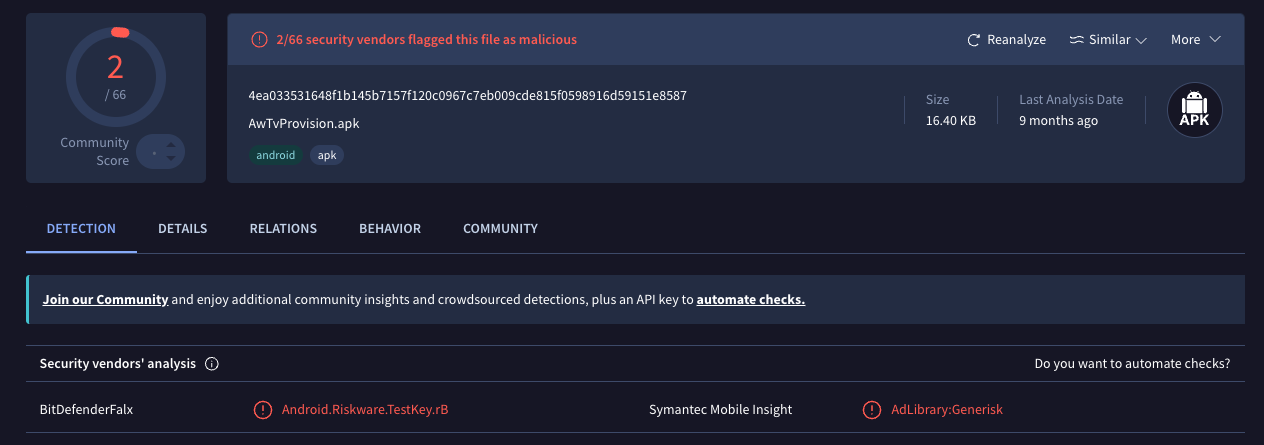
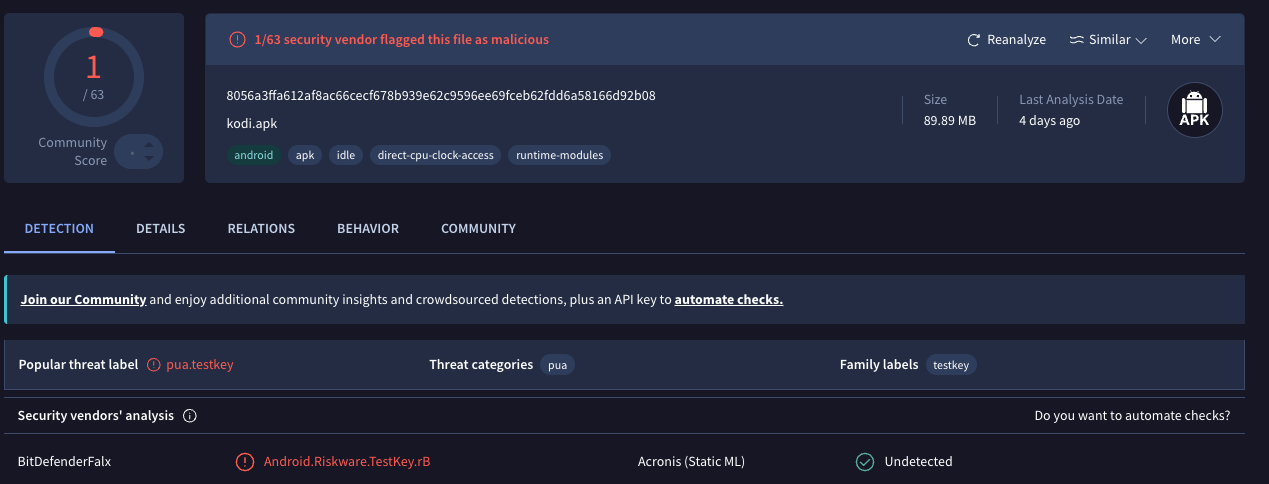
Besides the fact that the device itself is debuggable and signed with test keys, we also found that one of the pre-installed applications (org.xbmc.kodi) has the android:debuggable flag set to true. Official Android app release builds should never be debuggable. With the flag set, anyone with ADB access (which is open on this box) can attach a debugger, run run-as org.xbmc.kodi to read and modify its private data, and inject code into the process.
Note: Kodi is a free, open-source media centre application. The non-profit XBMC Foundation develops it, and it runs on Android, Windows, macOS, Linux and other platforms. Official releases of Kodi are signed with Team Kodi’s release key and are not debuggable. The fact that this box ships with a version of Kodi that is debuggable and signed with test keys is a serious security issue.
Kodi Repackaged System Application
As the Kodi application seemed a bit suspicious, we decided to investigate it further. We ran APKiD on all the APKs of the device and found that the Kodi app was likely repackaged. APKiD identifies how an Android app was built: it fingerprints the compiler that produced the DEX code, as well as packers, obfuscators and anti-analysis tricks. Some of these fingerprints, such as dexlib 2.x, point to repackaging tools like apktool and smali.
The following table shows the APK files that were flagged. In every report, the dexlib 2.x hit is on classes.dex, which indicates that the app was likely disassembled and rebuilt with apktool/baksmali. This is a strong indicator that the app was modified and repackaged, a common technique used by attackers to inject malicious code into legitimate applications. However, it could also just mean that the TV box manufacturer used apktool to modify the app for their own purposes, such as adding custom features or removing unwanted features. For Kodi, the other evidence (re-signing with the AOSP test key and the debuggable flag) supports the repackaging verdict. LandscapeWallpaper.apk and AtvWidget.apk still carry Google’s signature, so their hits may be false positives that need verification.
| APK Filename | Partition | Path in firmware |
|---|---|---|
| LandscapeWallpaper.apk | system | /system/app/LandscapeWallpaper/LandscapeWallpaper.apk |
| LandscapeWallpaper.apk | product | /product.img_extract/system/app/LandscapeWallpaper/LandscapeWallpaper.apk |
| AtvWidget.apk | system | /system/app/AtvWidget/AtvWidget.apk |
| AtvWidget.apk | product | /product.img_extract/system/app/AtvWidget/AtvWidget.apk |
| org.xbmc.kodi.apk | system | /system/oranth/preinstall/org.xbmc.kodi.apk |
| org.xbmc.kodi.apk | product | /product.img_extract/system/oranth/preinstall/org.xbmc.kodi.apk |
| base.apk | userdata | /data/app/org.xbmc.kodi-Mp7qgRGTmBq396a6FvaUKg==/base.apk |
A TV-box vendor has several possible motives for repackaging an APK, ranging from harmless to malicious.
Practical or benign reasons
- Integration into the firmware build. Prebuilt apps are often re-signed with the platform key so the AOSP build accepts them, or so they can share a UID or get system permissions. That only needs re-signing, but vendors often run the APK through apktool anyway.
- Hardware or compatibility fixes. Older or third-party apps may not run properly on cheap SoCs, for example video decoding or HDMI/audio passthrough on Allwinner chips, or TV remote and focus handling. Patching smali is quicker than asking the developer.
- Branding and defaults. Changing the app name, icons, default skin, language, or (for Kodi) preferred settings.
- Disabling update checks or the store dependency. This keeps the vendor’s tested version from being replaced by a newer one that might not work on the box.
- Debugging during development.
debuggable=trueis often set during development and never removed. That fits a firmware that is a userdebug build with test keys.
Commercial or grey-area reasons
- “Fully loaded” piracy boxes. Vendors preconfigure apps with unofficial content: Kodi with piracy add-ons, repositories, unknown sources enabled and auto-updates. Much of that sits in the add-on and data bundle, but sometimes the APK itself is patched too.
- Bypassing licensing or region restrictions. Removing Play licensing checks, root/integrity detection or geo-blocks, which is common for streaming apps on uncertified devices without Play Protect certification.
- Monetisation. Injecting the vendor’s own ad SDKs or affiliate IDs, or replacing the original developer’s ad IDs.
- Telemetry. Adding analytics or device-tracking SDKs.
Malicious reasons
- Trojanising popular apps. Hiding droppers, botnet clients (proxy, ad-fraud, residential proxy networks) or backdoors in well-known apps users trust. Known TV-box malware families (e.g. BadBox, Triada variants) use this technique.
- Persistence and stealth. A modified system or preinstalled app survives factory resets and looks legitimate to the user.
Where this Kodi fits
From what we have so far, Kodi most likely falls under points 1, 5 and 6. The firmware is userdebug with test keys, the vendor ships piracy add-ons via xbmc_addons.sh, and the APK was re-signed during the firmware build. Nothing so far shows injected malicious code, and its single VirusTotal detection is the generic test-key flag.
Diffing against the official kodi-18.1-Leia-armeabi-v7a.apk would settle it. If the only changes are the manifest (debuggable) and the signature, it’s sloppy integration. Added classes, URLs or native libraries would point to something more serious. Another indicator that would point towards sloppy integration is the existence of two xapk files: 2_com.disney.disneyplus_4.13.1-rc1-2025.08.15_apkmirror.com.xapk and 3_10_com.amazon.amazonvideo.livingroom_6.18.11_v15.3.0.265.xapk. These are the Disney+ and Amazon Prime Video apps, which are also pre-installed on the box. They don’t seem to be repackaged, but they are surely sideloaded, which is a common practice for TV boxes that don’t have Play Protect certification.
Kodi Add-ons & Piracy
The firmware does not only ship Kodi itself, but also a complete, pre-configured Kodi profile. It is stored as a ZIP archive in the system image, /system/oranth/xbmc_addons/org.xbmc.kodi.zip (SHA-256 2854f9d2…7480f77, 6,802 entries), and copied to the user storage on first boot by two vendor scripts:
1
2
3
4
5
6
7
8
# /system/bin/onstartup.sh (excerpt)
MARK=/data/local/fast_apks_installed
if [ ! -e $MARK ]; then
	pm disable com.google.android.tvlauncher
	...
	/system/bin/xbmc_addons.sh
	touch $MARK
fi
1
2
3
4
5
6
7
8
# /system/bin/xbmc_addons.sh (excerpt)
XBMC_MARK=/data/local/symbol_xbmc_addons
addons_zip=/system/oranth/xbmc_addons/org.xbmc.kodi.zip
Android_data=/sdcard/Android/data
...
busybox unzip -o -q $addons_zip -d $Android_data
...
touch $XBMC_MARK
The userdata partition of our dump contains both marker files (/data/local/fast_apks_installed and /data/local/symbol_xbmc_addons) and 6,801 unpacked files below /data/media/0/Android/data/org.xbmc.kodi/. The bundle was therefore not only shipped but installed on the device.
The add-on database of the profile (userdata/Database/Addons27.db) lists nine enabled video add-ons (plugin.video.*), eight of which provide content (the ninth, f4mTester, is a stream player). All of them were installed on 25 August 2018, which suggests that the profile is a snapshot taken from a reference device and copied into the firmware:
| Add-on (version) | Installed from | Purpose |
|---|---|---|
| Exodus (6.0.0) | repository.kodibae | Films and series, found via scrapers for third-party streaming and hosting sites |
| Placenta (1.4.4) | repository.blamo | Exodus fork with its own scrapers |
| Neptune Rising (1.4.9) | repository.blamo | Exodus fork |
| Incursion (0.1.17) | incursion.repository | Exodus fork |
| SportsDevil (2018.04.11) | repository.blamo | Live sports from “ad-financed sports streaming sites” (own description) |
| SkyNet (5.0.2) | repository.maverickrepo | Remotely maintained lists of films, TV and sports links |
| Chronos (2.3) | repository.skydarks | Same code base as SkyNet |
| YouTube (6.1.2) | repository.xbmc.org | Official YouTube add-on |
The remaining add-ons in the bundle are the repositories, scraper modules, link resolvers (urlresolver, resolveurl) and stream players (f4mTester, F4mProxy, streamlink) these add-ons depend on. None of them host content themselves. Instead, they search third-party websites for links: the Exodus scraper module alone contains Python modules named after streaming portals such as kinox, movie4k, serienstream and filmpalast. This is the typical set-up of a so-called “fully loaded” box, which promises free films, series and live sports out of the box. We did not assess the licensing status of the individual sources.
From a security perspective, the configuration is more worrying than the add-ons themselves. Kodi is configured to accept add-ons from unknown sources and to install add-on updates automatically:
1
2
3
<!-- userdata/guisettings.xml (excerpt) -->
<unknownsources>true</unknownsources>
<addonupdates default="true">0</addonupdates>   <!-- 0 = install updates automatically -->
The profile also references six third-party repository sources, all over plain HTTP:
1
2
3
4
5
6
7
<!-- userdata/sources.xml (excerpt) -->
<path pathversion="1">http://repo.mrblamo.xyz/</path>
<path pathversion="1">http://addons4kodi.site/</path>
<path pathversion="1">http://mavericktv.net/mavrepo</path>
<path pathversion="1">http://onenation.info/Repo</path>
<path pathversion="1">http://www.skydarks.com/skydarks/</path>
<path pathversion="1">http://lazykodi.com/</path>
Kodi add-ons are mainly Python code that runs with Kodi’s permissions. Whoever controls one of these repositories, or the domain behind it, can therefore likely push code to every box that still has this profile. On this device Kodi is additionally debuggable. The bundled add-on versions date from 2018; if a repository has since been abandoned, its domain can expire and be registered by someone else. And guess what: some of the domains have indeed expired.
⚠️ Disclaimer: We do not encourage anyone to attempt to compromise these boxes. The following is for educational and research purposes only. We did not attempt to take over any add-on repository or push code to a device ourselves, as that would be illegal.
Other suspicious and interesting findings
Beyond the test keys and the Kodi build, several of the vendor’s own system components stood out during the static analysis. We want to stress that everything below is based purely on static analysis of the extracted firmware. We decompiled the apps and inspected the native services, but we have not yet confirmed any of these behaviours on a running device. They are leads to verify dynamically, not proven exploits, and the numbers and code paths may look different once the box is actually running.
com.oranth.deviceinforeport:
A recurring theme is a small family of vendor apps, all signed with the platform test key and running as the system user (android.uid.system), that talk to the outside world over plain HTTP. Before describing them, it is worth being precise about how we know the traffic is cleartext, because this is a purely static observation. Three pieces of evidence line up. First, the server addresses are hardcoded in the decompiled code as literal http:// string constants, not https://. Second, these strings are not dead code: they are passed into real network calls, built with okhttp3 and java.net.HttpURLConnection (and not the TLS variant HttpsURLConnection), so the http:// URL is actually dialed. Third, the apps are explicitly allowed to use cleartext on a modern Android version — our scanners flagged usesCleartextTraffic="true" and a permissive network_security_config.xml — and the same URL strings appear verbatim in the raw system.img, confirming they are really shipped and not an artifact of one decompiler. What this proves is that the shipped defaults are unencrypted; the exact endpoint reached in the field can still be redirected through the system properties noted below, which is one more reason to confirm it dynamically.
The most interesting of these apps is com.oranth.deviceinforeport, a boot-started background service that behaves like a remote-management agent. In its decompiled code it periodically reports device identifiers (MAC address, chip ID, serial number) to a server and reacts to a set of numbered commands coming back from that server. Among those commands are ones that download and run a shell script, perform a factory reset (MASTER_CLEAR), reboot the box, silently install or uninstall apps, and lock the device with the message “This device has been locked! please contact your vendor.” One of its own log strings even reads “debug mode, remote shell script downloaded and will be executed.” Its command-and-control address is a hardcoded http:// URL on a private IP (http://192.168.199.215:8089/OranthTMS/...), overridable through the ro.tms.* / persist.tms.* system properties, and it talks to it with a plain HttpURLConnection — the cleartext pattern described above. Alongside it, com.oranth.upgradeapplication is a second system-level app whose hardcoded dev.xml.url (again http://...) points it at an XML file it fetches over HTTP and whose listed APKs it then installs, selecting targets by MAC address, with the only integrity check being an MD5 hash served from the same HTTP file. Because these channels are unauthenticated and unencrypted, anyone able to intercept the traffic or control the server could, on paper, push arbitrary code to the device. Whether these agents are actually reachable and active in the field is exactly the kind of thing we want to test dynamically.
com.oranth.accessibility:
A second observation concerns a system app with an accessibility service. com.oranth.accessibility runs as the system user and ships an AccessibilityService, which on Android is a powerful capability: such a service can read on-screen content and inject taps and input events across other apps. In the decompiled code it automates the Netflix user interface by locating buttons via their resource IDs and clicking them, and it contacts a server whose URL is stored obfuscated in the app (decoded, it resolves to a vendor HTTPS endpoint). The intent behind it looks like automated provisioning or account handling rather than something overtly malicious, but an unexplained, remotely-contacting accessibility service with system privileges is precisely the sort of thing that deserves a closer, dynamic look.
com.softwinner.settingsassist:
Finally, a few components widen the device’s attack surface in more conventional ways. com.softwinner.settingsassist, a privileged app holding the RECOVERY permission, exports an update screen that can be triggered by any other app without a permission check: it takes a caller-supplied file path, stages it, verifies it and hands it to the Android recovery to flash. The only safeguard is the signature check, and because the device trusts the public AOSP test key for updates (see above), this chain could plausibly let an ordinary app reach a full system update. Underneath the apps, the vendor also ships a set of native background services that run as root and expose themselves to other apps over Android’s Binder IPC: systemmixservice offers property, file and mount operations, while isomountservice (loopback-mounting disc images) and gpioservice (toggling hardware lines) follow the same pattern. In the service libraries we inspected, we did not spot any check of which app is calling before the operation is carried out. How exposed these services really are depends on the device’s SELinux policy, which was not part of our dump; the platform policy fragments we could read do allow ordinary app processes to call at least the systemmix service over Binder. All of this is static evidence only, and confirming whether these paths are actually reachable and exploitable on the running box is the obvious next step and the subject of our follow-up dynamic analysis.
How we plan to verify these findings
Because all of the above is static analysis, we end this section with the concrete steps we intend to run once the box is connected on the bench. The device already makes this easy for us: ADB is enabled and, as shown above, authentication is disabled, so we get a shell without any prompt.
-
Confirm the shell and root. Connect over USB (or over the network if ADB-over-TCP is active) and check the build and root state directly:
1
2
3
4
adb connect <box-ip>:5555        # only if ADB over TCP is on
adb shell getprop | grep -E "ro.adb.secure|ro.debuggable|service.adb.tcp.port|persist.root.enable"
adb shell getenforce             # Permissive vs Enforcing decides a lot below
adb shell su -c id               # does the bundled su give uid=0 without a prompt?
-
Watch the “TMS” agent (
com.oranth.deviceinforeport). Read the properties that configure it, then observe what it actually sends:1 2
adb shell getprop | grep -E "ro.tms|persist.tms|dev.xml" adb logcat | grep -iE "tms|deviceinforeport"
In parallel we should route the box through a proxy (for example
mitmproxywith a transparent rule, or simply a DNS override plus an HTTP listener) to capture its heartbeat and the command responses. Because the channel is likely plain HTTP, no certificate work is needed. To test the command handler without the real server, we could point the configured URL at our own host and reply with each command type in turn (download-and-run-script, lock, install) and observe the result. -
Test the silent installer (
com.oranth.upgradeapplication). We serve our ownapkupdate.xmlfrom a host the device is redirected to, referencing a harmless signed test APK with a matching MD5, and watch whether the box downloads and installs it unattended. -
Trace the accessibility service (
com.oranth.accessibility). We enable traffic capture and confirm what it sends to its decoded endpoint, and useuiautomator/dumpsys accessibilityto see which screens and apps it drives. -
Probe the exported update activity (
com.softwinner.settingsassist). From an ordinary, non-system test app (or viaam) we invoke the exported activity with a crafted file path and observe whether the recovery flow starts. A full proof of concept would pair this with an OTA zip signed using the public AOSP test key; we will only attempt that on our own device.1 2
adb shell am start -a softwinner.intent.action.otaactivity \ --es updateUSBPath /sdcard/test_update.zip
-
Reach the root Binder services. We check the SELinux reachability first (
adb shell dumpsys -l | grep -iE "softwinner|systemmix|gpio|isomount"and the loaded policy), then call the services from an unprivileged test app to see whethersystemmixservice’s property/file/mount operations execute for a normal caller.
All of these are deliberately conservative, run only against our own device, and aim to turn the “could plausibly” statements above into confirmed yes/no results. Where a finding is confirmed and affects users at large.
Dynamic Analysis
🔬 Dynamic analysis — coming soon. We are currently bringing the box up on the bench and running the verification steps above against the live device. The confirmed results, including which of the static findings actually hold, will be published here in a follow-up.
XC99: Static Analysis with FMD (RESULTS TO BE RELEASED SOON)
The detailed findings, including specific package names, hashes, and behavioral analysis of the discovered malware components, will be published soon.
Limitations & Future Work
While our static extraction pipeline successfully recovered full, byte-accurate firmware images from both TV set-top boxes, several methodological limitations remain:
- Over-The-Air (OTA) Delivery Vectors: Static inspection captures the factory ROM state. Malicious components delivered downstream via scheduled manufacturer OTA updates or dynamic in-app updates require periodic differential analysis over time.
- Dynamic TLS Interception: Gaining end-to-end visibility into live C2 communication requires transparent TLS proxying. Automated patching of Android network security configurations (
network_security_config.xml) directly within FMD is planned to facilitate automated MITM interception. - Large-Scale Multi-Device Testbeds: Expanding this empirical study to hundreds of low-cost streaming devices requires automating hardware dumping via multiplexed serial testbeds.