To give you a better understanding of the FirmwareDroid (FMD) architecture, this post provides an overview of the system components and how they interact. A foundational description of the original concept can be found in our research paper FirmwareDroid: Towards Automated Static Analysis of Pre-Installed Android Apps. FMD has evolved significantly since that publication; this document reflects the current, streamlined architecture.
Architecture Overview
The following diagram illustrates the primary architectural components and data flows:
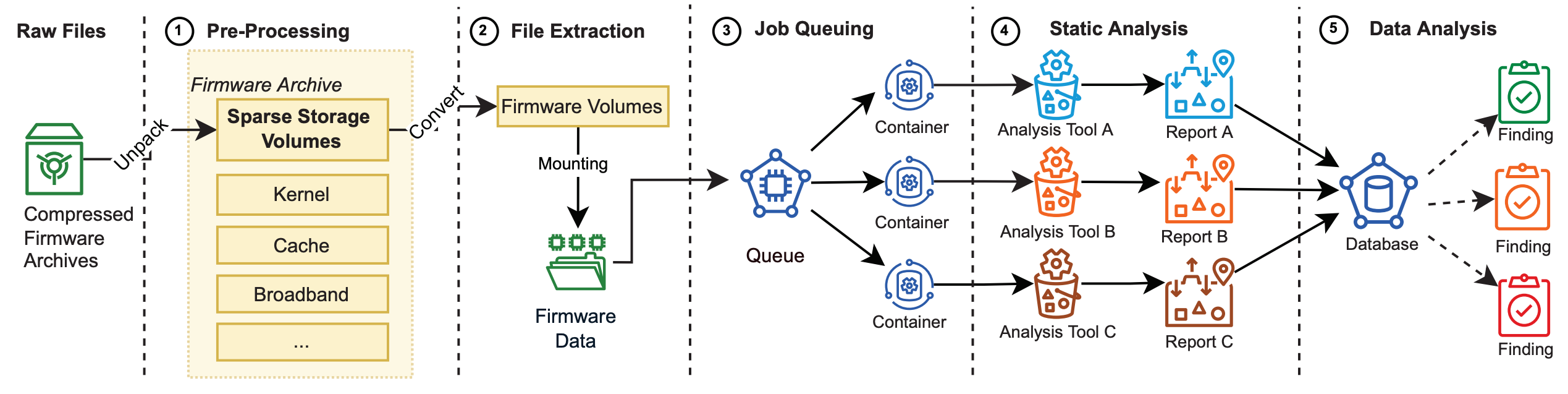
FirmwareDroid analyzes Android firmware images and their pre-installed applications (APKs) at scale. Its modular architecture is composed of isolated Docker containers orchestrated via Docker Compose:
- Reverse Proxy & TLS: Nginx provides TLS termination and routes requests to the API, web client, or static assets.
- Web & API Backend: A Django application served via Gunicorn exposing a unified GraphQL API and Django administration.
- Frontend Client: A single-page application built with React and served through Django/Nginx.
- Databases:
- MongoDB: Stores firmware metadata, partition structures, APK details, and static analysis reports (configured as a single-node replica set with keyfile authentication).
- Neo4j: Graph database for modeling relationships and structural knowledge graphs across firmware components.
- Task Queues & Workers: Redis coordinates background jobs using Redis Queue (RQ). Dedicated worker containers execute heavy firmware extraction and multi-engine static analysis asynchronously.
Main Directories and Files
A repository overview of the current FirmwareDroid codebase:
docker-compose.yml/docker-compose-release.yml: Compose definitions for building from source or deploying pre-built container bundles.docker/:init/: Bootstrap container (fmd-init) that automatically generates TLS certificates, database credentials, and service configurations on the first run.base/: Dockerfiles for base runtime images, backend, extractor, and APK scanner.build_images.sh: Automation script for building and tagging local Docker images.setup_apk_scanner.py: Build-time script setting up isolated Python virtual environments under/opt/scanners/.
docker_entrypoint.sh: Container startup entrypoint for the Django backend and RQ workers.blob_storage/: Host mount directory for persistent databases (MongoDB, Neo4j) and blob storage partitions (00_file_storagethrough09_file_storage).firmware-droid-client/: Submodule containing the React-based frontend web interface.requirements/: Python requirement manifests for backend services and individual static analysis tools.source/: Application source code:api/v2/: GraphQL schema definitions, mutations, and query resolvers.firmware_handler/: Archive extraction, partition parsing, and file indexing logic.hashing/: SSDeep and TLSH fuzzy hash generators.model/: MongoEngine database models.static_analysis/: Analyzer wrappers for tools like AndroGuard, MobSF, APKLeaks, etc.webserver/: Django configuration and RQ queue definitions.
Docker Containers
The deployment stack consists of the following microservices:
fmd-init(init): An idempotent bootstrap container. Runs before any other service (condition: service_completed_successfully). Generates self-signed certificates, Mongo replica set credentials, Redis authentication, and Django superuser credentials into an isolated named volume (fmd-config).backend-worker(web): The core webserver running Django, Gunicorn, and the GraphQL API.mongo-db-1: MongoDB database running with keyfile authentication and replica set mode enabled.neo4j: Neo4j graph database exposing Bolt and web browser endpoints.redis: In-memory data store acting as the message broker for background task queues.extractor-worker-1: High-privilege worker container listening on theextractorqueue. Responsible for unpacking firmware archives, mounting images, extracting partitions, and cataloging APKs.apk_scanner-worker-1: Dedicated worker container listening on thescannerqueue. Houses individual virtual environments for running static analyzers concurrently without library conflicts.nginx: Front-facing reverse proxy handling HTTPS on port443and HTTP redirect on port80.\
Zero-Configuration & Environment Overrides
FMD is designed to work completely zero-config out of the box:
- On initial startup, the
fmd-initcontainer provisions all passwords, cluster keys, and self-signed certificates directly into the isolatedfmd-configvolume. - Secrets never leak into the host Git repository. You can inspect generated credentials at any time:
1
2
3
docker compose logs init
# or copy the summary file:
docker compose cp init:/config/secrets/generated-secrets.txt .
- If you need to override runtime parameters (e.g.
DOMAIN_NAME, worker resource limitsDOCKER_CPU_LIMIT/DOCKER_MEMORY_LIMIT, or persistent storage bind paths), you can optionally supply a.envfile in the repository root.
Routine Operations and Monitoring
- GraphQL API Explorer: https://fmd.localhost/graphql/
- Django Admin: https://fmd.localhost/admin/
- RQ Worker Management: https://fmd.localhost/django-rq/
- Neo4j Browser: http://localhost:7474/